

In a world where technology constantly reshapes what's possible, 3D printing stands out as one of the most transformative innovations of our time. I've watched this technology evolve from clunky, expensive machines producing rough prototypes to sleek desktop printers creating everything from custom jewelry to functional prosthetics. Whether you're a curious hobbyist, a student, or a professional looking to expand your skills, this comprehensive guide will walk you through the fascinating process of 3D printing.
What is 3D Printing?
3D printing, also known as additive manufacturing, is a process of creating three-dimensional objects by depositing materials layer by layer according to a digital design. Unlike traditional manufacturing that often involves cutting away material (subtractive manufacturing), 3D printing builds objects from the ground up, allowing for complex geometries that would be impossible with conventional methods.
The technology has come a long way since its inception in the 1980s. What once required industrial-sized equipment costing hundreds of thousands of dollars can now be achieved with a desktop 3D printer that fits comfortably in your home office.
Types of 3D Printing Processes
Fused Deposition Modeling (FDM)
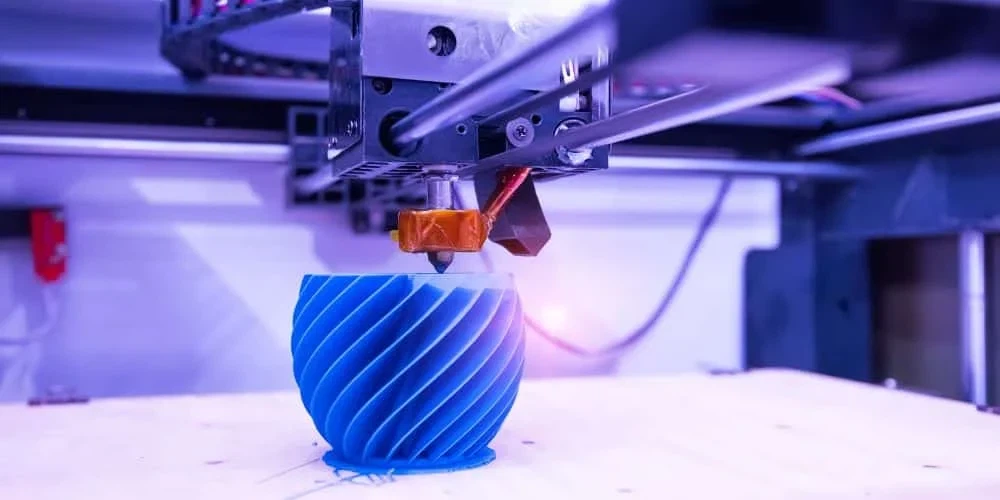
FDM is the most common and affordable 3D printing technology for beginners. It works by heating thermoplastic filament until it melts, then precisely extruding it through a nozzle to build objects layer by layer. Think of it as a very precise hot glue gun moving in three dimensions.
Materials commonly used in FDM printing include:
- PLA (biodegradable and easy to print)
- ABS (durable but requires ventilation)
- PETG (combines strength with ease of printing)
- TPU (flexible filament for rubber-like parts)
Stereolithography (SLA)
SLA printing uses liquid resin that hardens when exposed to specific wavelengths of light. A laser or projector cures each layer of resin as the build platform gradually rises or descends. SLA prints offer exceptional detail and smooth surface finishes, making them ideal for jewelry, dental applications, and highly detailed models.
Selective Laser Sintering (SLS)
SLS technology uses a high-powered laser to sinter powdered material (typically nylon) into a solid structure. The unsintered powder supports the part during printing, eliminating the need for support structures. Due to its cost and complexity, this process is primarily used in industrial settings.
Multi-Jet Fusion (MJF)
Developed by HP, MJF deposits fusing agents onto a bed of powder material, which is then exposed to heat to solidify. It's known for producing uniform, functional parts with excellent mechanical properties.
Selective Laser Melting (SLM)
SLM 3D printer uses a high-powered laser to melt metal powders fully, creating dense metal parts layer by layer. This technology is crucial for aerospace, automotive, and medical applications where metal parts with complex geometries are required.
Advantages and Development of 3D Printing
The evolution of 3D printing has brought numerous advantages across various fields:
Rapid Prototyping
One of the most significant benefits is the ability to iterate designs quickly. What once took weeks in traditional manufacturing can now be accomplished in hours. I've seen product development cycles shrink dramatically since teams can test, modify, and reprint designs in a single day.
Customization at Scale
3D printing excels at producing customized items without the traditional manufacturing constraints. This has revolutionized industries like healthcare, where patient-specific implants and prosthetics can be created with unprecedented precision.
Reduced Material Waste
Unlike subtractive manufacturing processes that cut away material, 3D printing only uses the material needed for the part itself (plus supports in some cases), resulting in significantly less waste.
Applications of 3D Printing Uses
Medical Innovations
From anatomical models for surgical planning to bioprinting tissues and organs, 3D printing is transforming healthcare. Dental aligners, hearing aids, and prosthetics are now routinely produced using various 3D printing technologies.
Aerospace and Automotive
Complex, lightweight components that would be impossible to manufacture traditionally are now being 3D printed for aircraft and vehicles. These parts often feature internal structures that optimize strength-to-weight ratios.
Consumer Products
The fashion industry has embraced 3D printing to create unique jewelry, accessories, and even clothing. Home décor, toys, and functional household items are also increasingly being produced through additive manufacturing.
Education
Schools and universities are incorporating 3D printing into their curriculum, allowing students to bring their ideas to life and better understand concepts in engineering, design, and manufacturing.
How to 3D Print?
Step 1: Create or Find a Design
Every 3D print begins with a digital 3D model. You can create your own using CAD (Computer-Aided Design) software like Fusion 360, Tinkercad, or Blender. Alternatively, websites like Thingiverse, Printables, and Cults3D offer thousands of free and paid models ready to download.
For beginners, I recommend starting with existing designs while you learn the printing process. You'll have plenty of time to dive into 3D modeling once you understand the capabilities and limitations of your printer.
Step 2: Prepare Your Model for Printing (Slicing)
Once you have a 3D model, you'll need to prepare it for printing using slicing software. Popular options include Cura, PrusaSlicer, and Simplify3D. The slicer converts your 3D model into G-code-instructions that tell your 3D printer exactly how to build the object layer by layer.
During slicing, you'll set crucial parameters like:
Step 3: Prepare Your 3D Printer
Before printing, ensure your printer is properly calibrated. This typically involves:
- Layer height (affecting detail and print time)
- Print speed
- Temperature settings
- Infill percentage (internal density)
- Support structures
- Leveling the build plate
- Loading filament
- Checking that the nozzle is clean
- Applying adhesion solution to the build surface if needed
Step 4: Start Printing
Transfer your G-code file to your printer (via SD card, USB, or Wi-Fi, depending on your printer) and start the print. Most printers have a display interface where you can select your file and initiate printing.
Step 5: Monitor the Process
While modern printers are quite reliable, it's good practice to monitor the first few layers to ensure proper adhesion to the build plate. After that, periodic checks can help catch any issues before they ruin your print.
Step 6: Post-Processing
Once printing is complete, your part may require some finishing:
- Removing support structures
- Sanding rough surfaces
- Acetone smoothing (for ABS)
- Painting or other finishing techniques
General Tips for Safe 3D Printing
Ventilation Matters
Always ensure adequate ventilation, especially when printing with materials like ABS that can release potentially harmful fumes. If possible, place your printer in a well-ventilated room or consider building an enclosure with air filtration.
Fire Safety
Though rare, 3D printer fires can occur. Never leave your printer completely unattended for extended periods, especially overnight prints. Consider investing in a smoke detector specifically for your printing area.
Start Simple
Your first prints should be relatively simple objects with flat bottoms and minimal overhangs. As you gain experience, you can gradually tackle more complex designs.
Join the Community
The 3D printing community is incredibly supportive. Forums, Reddit communities like r/3Dprinting, and local maker spaces are excellent resources for troubleshooting and inspiration.

FAQ
Can I 3D print whatever I want?
While 3D printing offers tremendous freedom, there are limitations based on your printer's capabilities, material properties, and legal considerations. For example, printing weapons or copyrighted designs may be illegal in your jurisdiction.
How much does it cost to 3D print?
Entry-level FDM printers start around $200-300, with filament costing roughly $20-30 per kilogram. The cost per print depends on size, infill density, and material used, but most small to medium objects cost just a few dollars in material.
How long does it take to 3D print?
Print times vary dramatically based on size, complexity, and quality settings. Small, simple objects might print in 30 minutes, while larger, detailed prints could take 24+ hours. Faster printing generally comes at the expense of quality.